
An introduction to RepoManager, batch management of multiple Git repositories
Presenting RepoManager, a command line interface (CLI) for batch management of multiple Git repositories. RepoManager is available under the MIT license. The Ruby source is located at github.com/robertwahler/repo_manager
Overview
RepoManager is a wrapper for Git , the distributed version control system. RepoManager's wrapper functions allow a single Git command to be executed across multiple git repositories.
For example, you have two git repositories named repo1 and repo2 and you want to check the status of both working folders.
without repoman
cd ~/workspace/delphi/repo1
git status

cd ~/workspace/delphi/repo2
git status
with repoman
repo status
suitable for
- Maintenance and documentation of loosely connected source code repositories.
- Synchronization or light weight mirroring of data across a network. That is a job for rsync. Or is it? If you develop for multiple platforms across multiple (virtual) machines rsync'ing may not be the best option. If you already have everything tucked into git repositories, you can use a single 'repo pull' command to mirror all of your repositories to one location for backup or reference.
not suitable for
- Maintaining related source code repositories. There are suitable tools for that including git's own 'git submodules', git-subtree, and GitSlave.
Getting started with RepoManager
installation
The RepoManager gem is available on RubyGems.org
gem install repo_manager
help
RepoManager's binary is named repo
repo --help
repo --tasks
repo help generate:init
Example Usage: Using RepoManager to Backup and Synchronize PC Game Saves
The remainder of this article will examine a single use case.
Use case: Backup and synchronization of PC save games folders to a central repository (ie Drop Box folder) using Git. Game saves are typically scattered across multiple folders and drives.
This example demonstrates the following features:
- Adding RepoManager user tasks, see repo_manager/tasks/
- Adding destructive git commands to the default whitelisted non-destructive git commands
- Testing user tasks with Cucumber, see repo_manager/features/
- Relative paths (not absolute) in repo_manager/repo.conf making the folder portable
- Bash completion for repo names, works on Win32 using Cygwin or MSYS Bash
The full source of this example is available at github.com/robertwahler/repo_manager/examples
create configuration
The following commands were used to create this example from scratch
mkdir -p examples/pc_saved_game_backup && cd examples/pc_saved_game_backup
Create configuration structure with the built-in 'generate:init' task
We are creating a local configuration. For a global configuration, you would execute the init command in your home folder
repo generate:init repo_manager
Session screenshot
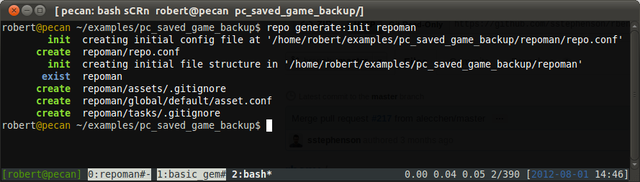
Create the initial configuration via generate:init
add sample data
Add a few example save game folders. These folders would normally be scattered over the file system.
mines
mkdir -p saved_games/mines/saves

# profile data will not be stored in the Git repo since it may differ from PC to PC
echo "# dummy profile data" > mines/my_profile.ini

echo "# dummy save" > saved_games/mines/saves/save1
echo "# dummy save" > saved_games/mines/saves/save2
hearts
mkdir -p saved_games/hearts

echo "# dummy save" > saved_games/hearts/save1
echo "# dummy save" > saved_games/hearts/save2
create remote folder
This folder will act as a remote to hold bare Git repositories. These repos will store backups of our game saves, normally, this folder would be on a remote server, NAS, or Drop Box like service.
mkdir remote
create the specialized 'git init' task
User tasks can be added directly to the repo_manager/tasks folder. This task doesn't use any RepoManager specific features, instead, it calls git directly via Thor's run command. Adding the script this way will keep this related functionality with this specific RepoManager configuration. Run repo -T to see a full list of built-in tasks as well as user defined tasks.
    require 'fileutils'

    module RepoManager

      class Generate < Thor

        # full path to the remote folder
        REMOTE = File.expand_path('remote')

        # Create, add, and commit the contents of the current working directory and
        # then push it to a predefined remote folder
        #
        # @example From the repo working
        #
        #   cd ~/my_repo_name
        #   repo generate:remote my_repo_name
        #
        # @example Specify the path to the working folder
        #
        #   repo generate:remote my_repo_name --path=/path/to/my_repo_name

        method_option :remote, :type => :string, :desc => "remote folder or git host, defaults to '#{REMOTE}'"
        method_option :path, :type => :string, :desc => "path to working folder, defaults to CWD"

        desc "remote REPO_NAME", "init a git repo in CWD and push to remote '#{REMOTE}'"
        def remote(name)
          path = options[:path] || FileUtils.pwd
          remote = options[:remote] || "#{File.join(REMOTE, name + '.git')}"

          Dir.chdir path do
            run("git init")

            # core config with windows in mind but works fine on POSIX
            run("git config core.autocrlf false")
            run("git config core.filemode false")
            exit $?.exitstatus if ($?.exitstatus > 1)

            # add everthing and commit
            run("git add .")
            run("git commit --message #{shell_quote('initial commit')}")
            exit $?.exitstatus if ($?.exitstatus > 1)

            # remove old origin first, if it exists
            run("git remote add origin #{remote}")
            run("git config branch.master.remote origin")
            run("git config branch.master.merge refs/heads/master")
            exit $?.exitstatus if ($?.exitstatus > 1)
          end

          run("git clone --bare #{shell_quote(path)} #{remote}")
          exit $?.exitstatus if ($?.exitstatus > 1)

          say "init done on '#{name}'", :green
        end

      end
    end
add remotes
In one step, we will initialize a new git repository with the working folder's content and push to a new bare repository for backup.
Normally, you don't need to specify the --path if you are already in the working folder and the repo_manager can find its global config file. For this example, we are using relative paths and will specify the working folder on the command line via the '--path' option.
repo generate:remote mines --path=saved_games/mines/saves
repo generate:remote hearts --path=saved_games/hearts
create the repo_manager asset configuration files
repo add:asset saved_games/mines/saves --name=mines --force
repo add:asset saved_games/hearts --force
Get information on configured saved game repositories
repo list --short
repo status --unmodified DOTS
Session screenshot
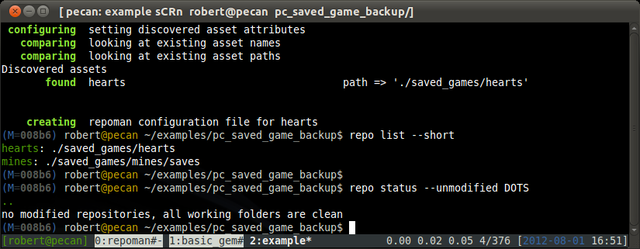
Running repo list status unmodified repos
Create the specialized Update task
The following user task will run repo add -A, repo commit, and repo push on all modified repos.
    module RepoManager
      class Action < Thor
        namespace :action
        include Thor::Actions
        include RepoManager::ThorHelper

        class_option :force, :type => :boolean, :desc => "Force overwrite and answer 'yes' to any prompts"

        method_option :repos, :type => :string, :desc => "Restrict update to comma delimited list of repo names", :banner => "repo1,repo2"
        method_option :message, :type => :string, :desc => "Override 'automatic commit' message"
        method_option 'no-push', :type => :boolean, :default => false, :desc => "Force overwrite of existing config file"

        desc "update", "run repo add -A, repo commit, and repo push on all modified repos"
        def update

          initial_filter = options[:repos] ? "--repos=#{options[:repos]}" : ""
          output = run("repo status --short --unmodified=HIDE --no-verbose --no-color #{initial_filter}", :capture => true)

          case $?.exitstatus
            when 0
              say 'no changed repos', :green
            else

              unless output
                say "failed to successfully run 'repo status'", :red
                exit $?.exitstatus
              end

              repos = []
              output = output.split("\n")
              while line = output.shift
                st,repo = line.split("\t")
                repos << repo
              end
              filter = repos.join(',')

              unless options[:force]
                say "Repo(s) '#{filter}' have changed."
                unless ask("Add, commit and push them? (y/n)") == 'y'
                  say "aborting"
                  exit 0
                end
              end

              say "updating #{filter}"

              run "repo add -A --no-verbose --repos #{filter}"
              exit $?.exitstatus if ($?.exitstatus > 1)

              commit_message = options[:message] || "automatic commit @ #{Time.now}"
              run "repo commit --message=#{shell_quote(commit_message)} --no-verbose --repos #{filter}"
              exit $?.exitstatus if ($?.exitstatus > 1)

              unless options['no-push']
                run "repo push --no-verbose --repos #{filter}"
                exit $?.exitstatus if ($?.exitstatus > 1)
              end

              say "update finished", :green
            end

        end
      end
    end
whitelist non-default Git commands
Only a small subset of non-destructive git commands are enabled by default. We will add the commands needed by our user task to the commands whitelist.
Edit repo.conf and add 'push, add, and commit' to the commands whitelist
    diff --git a/repo_manager/repo.conf b/repo_manager/repo.conf
    index 3cc6dbe..226b8c0 100644
    --- a/repo_manager/repo.conf
    +++ b/repo_manager/repo.conf
    @@ -36,6 +36,9 @@ commands:
     - ls-files
     - show
     - status
    +- push
    +- add
    +- commit
using the new tasks
To view all the available tasks
repo --tasks
or just
repo -T
Session screenshot
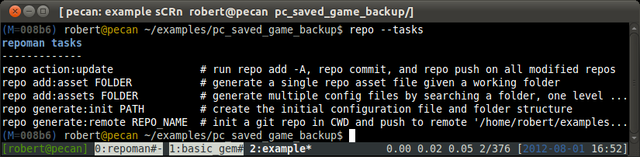
Listing RepoManager tasks includes user and built-in tasks
Using the action:update task to backup saved games.
repo action:update
Session screenshot
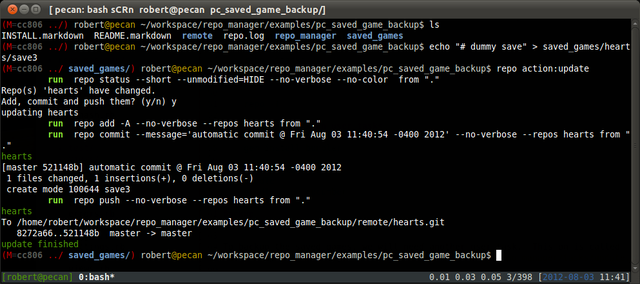
Example action:update usage with one new save game
Synchronizing saved games to another PC can be accomplished using Git's 'pull' command.
verify working folders are clean, if they are not, either revert them or commit and push
repo status
pull from remote to all configured repos
repo pull
Testing user tasks with Cucumber
Add a Gemfile for use by Bundler
source "http://rubygems.org"

gem "repo_manager"

gem "bundler", ">= 1.0.14"
gem "rspec", ">= 2.6.0"
gem "cucumber", "~> 1.0"
gem "aruba", "= 0.4.5"

gem "win32console", :platforms => [:mingw, :mswin]
Install the dependencies
gem install bundler

cd repo_manager
bundle
Add Cucumber features and support files
NOTE: This is an excerpt, see the file for the full listing of functional tests
repo_manager/features/tasks/update.feature
@announce
Feature: Automatically commit and update multiple repos

  Background: Test repositories and a valid config file
    Given a repo in folder "test_path_1" with the following:
      | filename         | status | content  |
      | .gitignore       | C      |          |
    And a repo in folder "test_path_2" with the following:
      | filename         | status | content  |
      | .gitignore       | C      |          |
    And a file named "repo.conf" with:
      """
      ---
      folders:
        assets : repo/asset/configuration/files
      """
    And the folder "repo/asset/configuration/files" with the following asset configurations:
      | name    | path         |
      | test1   | test_path_1  |
      | test2   | test_path_2  |


  Scenario: No uncommitted changes
    When I run `repo action:update`
    Then the output should contain:
      """
      no changed repos
      """

  ...
repo_manager/features/support/steps.rb
    require 'repo_manager/test/base_steps'
    require 'repo_manager/test/asset_steps'
    require 'repo_manager/test/repo_steps'
repo_manager/features/support/env.rb
    require 'repo_manager'
    require 'aruba/cucumber'
    require 'rspec/expectations'

    Before do
      @aruba_timeout_seconds = 10
    end

    Before('@slow_process') do
      @aruba_io_wait_seconds = 2
    end
repo_manager/features/support/aruba.rb
    require 'aruba/api'
    require 'fileutils'

    module Aruba
      module Api

        # override aruba avoid 'current_ruby' call and make sure
        # that binary run on Win32 without the binstubs
        def detect_ruby(cmd)
          wrapper = which('repo')
          cmd = cmd.gsub(/^repo/, "ruby -S #{wrapper}") if wrapper
          cmd
        end
      end
    end
Run the functional user tests
bundle exec cucumber
Session screenshots
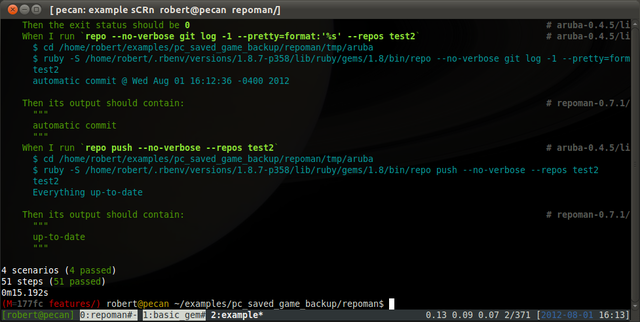
Testing users tasks with Cucumber
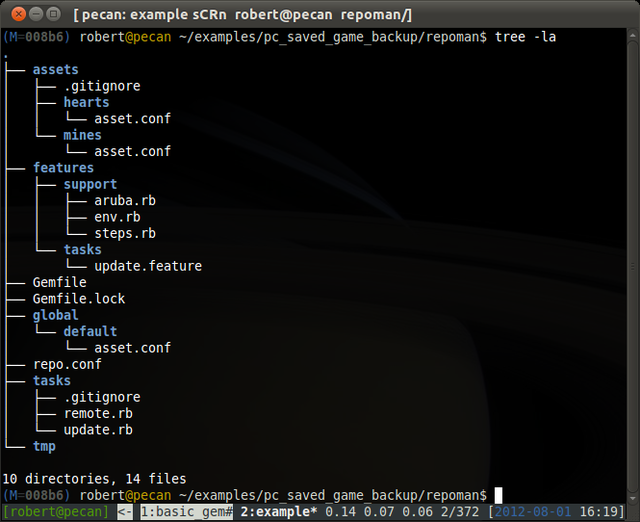
RepoManager file structure including user tasks
Bash completion
Handy functions for use under Bash. These work fine on Win32 using Git-Bash.
CD command for working folders
rpushd: repo pushd (push directory). Wrapper for 'pushd'.
Completion for repo names
rcd: repo cd (change directory). Wrapper for 'cd', allows for simple cd repo name to the working folder on the filesystem referenced by the 'path' configuration variable.
Source these functions in your .bashrc
function rcd(){ cd "$(repo --match=ONE --no-color path $@)"; }
function rpushd(){ pushd "$(repo path --match=ONE --no-color $@)"; }
alias rpopd="popd"

# provide completion for repo names
function _repo_names()
{
  local cur opts prev
  COMPREPLY=()
  cur="${COMP_WORDS[COMP_CWORD]}"
  opts=`repo list --list=name --no-color`

  COMPREPLY=( $(compgen -W "${opts}" -- ${cur}) )
  return 0
}
complete -F _repo_names rcd rpushd repo
For more information, please consult the source: http://github.com/robertwahler/repo_manager.
commentsDynabix: An ActiveRecord Ruby gem for attribute serialization
Dy-na-bix, tasty serialization attribute accessors for ActiveRecord
Presenting Dynabix. Dynabix is an ActiveRecord 3.x RubyGem that facilitates attribute serialization via dynamically created read/write accessors.
Overview
Data serialization is a technique that can be used to persist data to the database without changing the schema when adding or removing attributes. A single text field can contain multiple attributes. Serialization is useful for one-off situations like voting polls or frequently changing on-line questionnaires. Dynabix uses ActiveRecord's serialize method under the hood.
UPDATE 6/26/12
ActiveRecord as of 3.2.1, as pointed out in the comments, has a very similar native method store. Dynabix differs from store by providing a declarative DSL for defining multiple stores (Ruby 1.9+), has separate read/write accessors, and stores to the database as HashWithIndifferentAccess. Unless you need one of these specific features, using the native 'store' method is recommended.
Source
Dynabix's source is available under the MIT license here https://github.com/robertwahler/dynabix. The documentation is located on Rubydoc.info at http://rubydoc.info/gems/dynabix
Usage
Add a text column "metadata" to your model migration. This column will store all the attribute values defined by Dynabix.
    class AddMetadataToThings < ActiveRecord::Migration

      def change
        add_column :things, :metadata, :text
      end

    end
Add accessors to your model using the default column name ":metadata", specify the attributes in a separate step.
    class Thing < ActiveRecord::Base
      has_metadata

      # full accessors
      metadata_accessor :breakfast_food, :wheat_products, :needs_milk

      # read-only accessor
      metadata_reader :friends_with_spoons
    end
Specifying attributes for full attribute accessors in one step
    class Thing < ActiveRecord::Base
      has_metadata :metadata, :breakfast_food, :wheat_products, :needs_milk
    end
Using the new accessors
    thing = Thing.new

    thing.breakfast_food = 'a wheat like cereal"

    # same thing, but using the metadata hash directly
    thing.metadata[:breakfast_food] = 'a wheat like cereal"
Ruby 1.9+
Dynabix under Ruby 1.9+ enables specifying multiple metadata columns on a model. You are not limited to using the static "metadata" column.
Add text columns "cows" and "chickens" to your "thing" model migration
    class AddMetadataToThings < ActiveRecord::Migration

      def change
        add_column :things, :cows, :text
        add_column :things, :chickens, :text
      end

    end
Specifying multiple metadata serializers to segregate like data into separate database columns (Ruby 1.9 only)
    class Thing < ActiveRecord::Base
      has_metadata :cows
      has_metadata :chickens, :tasty, :feather_count

      # read-only
      cows_reader :likes_milk, :hates_eggs

      # write-only
      cows_writer :no_wheat_products

      # extra full accessors for chickens
      chickens_accessor :color, :likes_eggs, :egg_count
    end
Using the new accessors
    thing = Thing.new

    # cow stuff
    thing.no_wheat_products = true

    # chicken stuff
    thing.likes_eggs = true
    thing.egg_count = 12

    # using the metadata hash directly to read the data since
    # we only created a write accessor
    thing.cows[:no_wheat_products].should be_true
Runtime dependencies
- Activerecord 3.x
Installation
Add Dynabix to your Gemfile
gem "dynabix"
Install the gem with Bundler
bundle install
Development
Get the source
cd workspace

git clone https://github.com/robertwahler/dynabix.git

cd dynabix
Install the dependencies
bundle install
Run the specs
bundle exec rake spec
Autotest with Guard
bundle exec guard
comments
Using Ruby to Automate Windows GUI Applications for Testing
Presenting Win32-autogui. A Ruby Win32 GUI testing framework packaged as a RubyGem.
Overview
Win32-autogui provides a framework to enable GUI application testing with Ruby. This facilitates integration testing of Windows binaries using Ruby based tools like RSpec and Cucumber regardless of the language used to create the binaries.
The source code repository is available here: http://github.com/robertwahler/win32-autogui. The repository contains specs and an example Win32 program with source and specs written in Delphi (Object Pascal).
Driving the Window's Calculator Application with IRB
Here is a quick demo using the Ruby Interactive Shell (IRB) under Cygwin on Windows XP to drive "calc.exe."
Install the Gem
Win32-autogui is available on RubyGems.org
gem install win32-autogui
IRB Session
Start up IRB
irb
Paste the following lines into your shell's IRB session.
Note: Window's "calc.exe" is used as the target binary by Win32-autogui's internal specs. The complete source to the wrapper is available here: spec/applications/calculator.rb.
    require 'win32/autogui'
    include Autogui::Input

    class Calculator < Autogui::Application
      def initialize
        super :name => "calc", :title => "Calculator"
      end
      def edit_window
        main_window.children.find {|w| w.window_class == 'Edit'}
      end
    end
Now we can start up the calculator
calc = Calculator.new
calc.running?
Session screenshot
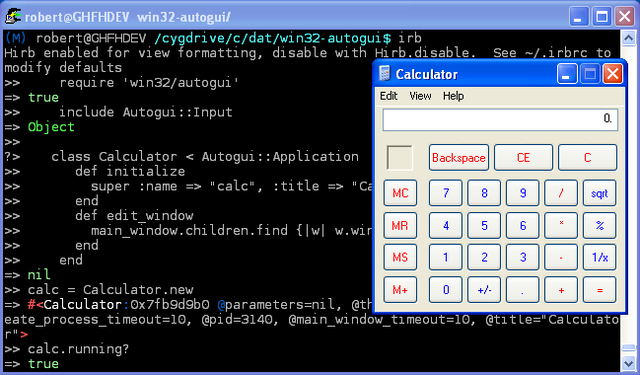
Driving the calculator in IRB (1)
Get some information
calc.pid
calc.main_window.window_class
calc.main_window.children.count
Perform a calculation
calc.set_focus; type_in('2+2=')
Get the result
calc.edit_window.text
Shut it down
calc.close
calc.running?
Session screenshot
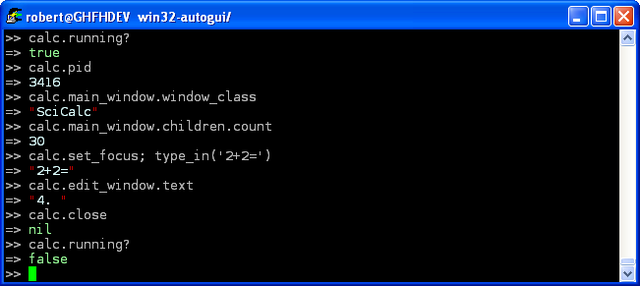
Driving the calculator in IRB (2)
RSpec + Win32-autogui for Testable GUI Specifications
The Win32-autogui repository contains an example Win32 program with source, testable binary, and specs written in Delphi (Object Pascal) located here: http://github.com/robertwahler/win32-autogui/tree/master/examples/quicknote.
Quicknote is a bare bones notepad clone. Here is the spec file spec/form_splash_spec.rb for the splash screen functionality.
    require File.expand_path(File.dirname(__FILE__) + '/../spec_helper')

    include Autogui::Input

    describe "FormSplash" do
      after(:all) do
        if @application.running?
          @application.splash.wait_for_close if @application.splash
          @application.file_exit
          # still running? force it to close
          @application.close(:wait_for_close => true)
          @application.should_not be_running
        end
      end

      describe "startup with no command line parameters" do
        before(:all) do
          # --nosplash is the default, turn it back on
          @application = Quicknote.new :parameters => ''
          @application.should be_running
        end

        it "should show" do
          @application.splash.should_not be_nil
        end
        it "should close within 5 seconds" do
          @application.splash.should_not be_nil
          seconds = 5
          timeout(seconds) do
            @application.splash.wait_for_close
          end
          @application.splash.should be_nil
        end
      end

      describe "startup with '--nosplash' command line parameter" do
        it "should not show" do
          @application = Quicknote.new :parameters => '--nosplash'
          @application.should be_running
          @application.splash.should be_nil
        end
      end

    end
The Quicknote.exe application wrapper. Each of the testable application windows must be defined in a subclass of Autogui::Application. Partial code from lib/quicknote.rb.
    class Quicknote < Autogui::Application

      def initialize(options = {})
        # relative path to app using Windows style path
        @name ="exe\\quicknote.exe"
        defaults = {
                     :title=> "QuickNote -",
                     :parameters => '--nosplash',
                     :main_window_timeout => 20
                   }
        super defaults.merge(options)
      end

      def edit_window
        main_window.children.find {|w| w.window_class == 'TMemo'}
      end

      def status_bar
        main_window.children.find {|w| w.window_class == 'TStatusBar'}
      end

      def dialog_about
        Autogui::EnumerateDesktopWindows.new.find do |w|
          w.title.match(/About QuickNote/) && (w.pid == pid)
        end
      end

      def splash
        Autogui::EnumerateDesktopWindows.new.find do |w|
          w.title.match(/FormSplash/) && (w.pid == pid)
        end
      end

      def message_dialog_confirm
        Autogui::EnumerateDesktopWindows.new.find do |w|
          w.title.match(/Confirm/) && (w.pid == pid)
        end
      end

      # Title and class are the same as dialog_overwrite_confirm
      # Use child windows to differentiate
      def dialog_overwrite_confirm
        Autogui::EnumerateDesktopWindows.new.find do |w|
          w.title.match(/^Text File Save$/) &&
            (w.pid == pid) &&
            (w.window_class == "#32770") &&
            (w.combined_text.match(/already exists/))
        end
      end

      # Title and class are the same as dialog_overwrite_confirm
      def file_save_as_dialog
        Autogui::EnumerateDesktopWindows.new.find do |w|
          w.title.match(/Text File Save/) &&
            (w.pid == pid) &&
            (w.window_class == "#32770") &&
            (w.combined_text.match(/Save \&in:/))
        end
      end

      ...
Autotesting Quicknote with Watchr
Watchr provides a flexible alternative to Autotest.
NOTE: The following assumes a global setting of 'git config core.autocrlf input' and that you want to modify the Delphi 7 source to Quicknote which requires CRLF line endings.
Grab the source for Quicknote
cd ~/workspace
git clone http://github.com/robertwahler/win32-autogui -n
cd win32-autogui
git config core.autocrlf true
git checkout
Install watchr
gem install watchr
Run watchr
watchr spec/watchr.rb
Watchr will now watch the files defined in 'spec/watchr.rb' and run RSpec or Cucumber, as appropriate.
Session screenshot
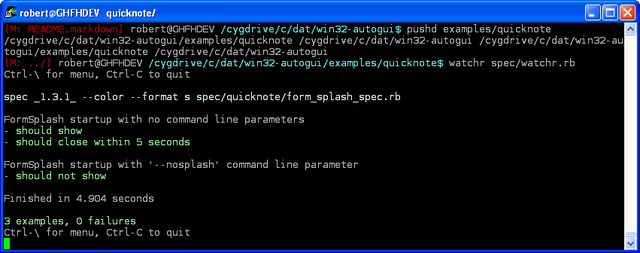
Watchr session running form_splash_spec.rb
For more information, please consult the source: http://github.com/robertwahler/win32-autogui.
commentsUsing Git to Maintain Common RubyGem Functionality with BasicGem
Do you maintain several different RubyGems? Maybe you maintain dozens? Wouldn't it be nice to not have to repeat yourself when making changes that should be common to all the gems in your stable? For example, you decide that going forward, you will use Bundler for all your gem dependency needs. You could tweak your gemspecs and Rakefiles for each of your gems individually or you could use your customized fork of BasicGem as a common ancestor for all your gems. Now you can modify your BasicGem fork and merge these tweaks using Git into all your gems. As simple as...
cd ~/workspace/my_gem_cloned_from_my_basic_gem_fork
git pull my_basic_gem_fork HEAD
git mergetool
Introducing BasicGem, Gem Maintenance with Git
BasicGem is an opinionated RubyGem structure. BasicGem provides no stand-alone functionality. Its purpose is to provide a repository for jump-starting a new RubyGem and to provide a repository for cloned applications to pull future enhancements and fixes.
Features/Dependencies
- Bundler for dependency management http://github.com/carlhuda/bundler
- Rspec for unit testing http://github.com/dchelimsky/rspec
- Cucumber for functional testing http://github.com/aslakhellesoy/cucumber
- Aruba for CLI testing http://github.com/aslakhellesoy/aruba
- YARD for documentation generation http://github.com/lsegal/yard
Example Usage, Jump-starting a New Gem with BasicGem
The following steps illustrate creating a new gem called "mutagem" that handles file based mutexes. See http://github.com/robertwahler/mutagem for full source.
NOTE: We are cloning from BasicGem directly. Normally, you will want to clone from your own fork of BasicGem so that you can control and fine-tune which future BasicGem modifications you will support.
cd ~/workspace
git clone git://github.com/robertwahler/basic_gem.git mutagem
cd mutagem
Setup the repository for the cloned project
We are going to change the origin URL to our own server and setup a remote for pulling in future BasicGem changes. If our own repo for your new gem is setup at git@red:mutagem.git, change the URL with sed:
sed -i 's/url =.*\.git$/url = git@red:mutagem.git/' .git/config
Push up the unchanged BasicGem repo
git push origin master:refs/heads/master
Allow Gemlock.lock to be stored in the repo
sed -i '/Gemfile\.lock$/d' .gitignore
Add BasicGem (or your fork of BasicGem) as remote for future merges
git remote add basic_gem git://github.com/robertwahler/basic_gem.git
Rename your gem
Change the name of the gem from basic_gem to mutagem. Note that renames will be tracked in future merges since Git is tracking content and the content is non-trivial.
git mv lib/basic_gem.rb lib/mutagem.rb
git mv basic_gem.gemspec mutagem.gemspec

# commit renames now
git commit -m "rename basic_gem files"

# BasicGem => Mutagem
find . -name *.rb -exec sed -i 's/BasicGem/Mutagem/' '{}' +
find . -name *.feature -exec sed -i 's/BasicGem/Mutagem/' '{}' +
sed -i 's/BasicGem/Mutagem/' Rakefile
sed -i 's/BasicGem/Mutagem/' mutagem.gemspec

# basic_gem => mutagem
find ./spec -type f -exec sed -i 's/basic_gem/mutagem/' '{}' +
find . -name *.rb -exec sed -i 's/basic_gem/mutagem/' '{}' +
find . -name *.feature -exec sed -i 's/basic_gem/mutagem/' '{}' +
sed -i 's/basic_gem/mutagem/' Rakefile
sed -i 's/basic_gem/mutagem/' mutagem.gemspec
Replace TODO's and update documentation
- Replace README.markdown
- Replace HISTORY.markdown
- Replace TODO.markdown
- Replace LICENSE
- Replace VERSION
- Modify .gemspec, add author information and replace the TODO's
Your gem should now be functional
rake spec
rake features
Setup git copy-merge
When we merge future BasicGem changes to our new gem, we want to always ignore some upstream documentation file changes.
Set the merge type for the files we want to ignore in .git/info/attributes. You could specify .gitattributes instead of .git/info/attributes but then if your new gem is forked, your forked repos will miss out on document merges.
echo "README.markdown merge=keep_local_copy" >> .git/info/attributes
echo "HISTORY.markdown merge=keep_local_copy" >> .git/info/attributes
echo "TODO.markdown merge=keep_local_copy" >> .git/info/attributes
echo "LICENSE merge=keep_local_copy" >> .git/info/attributes
echo "VERSION merge=keep_local_copy" >> .git/info/attributes
Setup the copy-merge driver. The "trick" is that the driver, keep_local_copy, is using the shell command "true" to return exit code 0. Basically, the files marked with the keep_local_copy merge type will always ignore upstream changes if a merge conflict occurs.
git config merge.keep_local_copy.name "always keep the local copy during merge"
git config merge.keep_local_copy.driver "true"
Commit
git add Gemfile.lock
git commit -a -m "renamed basic_gem to mutagem"
Add code to project's namespace
mkdir lib/mutagem
vim lib/mutagem/mutex.rb
Merging Future BasicGem Changes
Cherry picking method
git fetch basic_gem
git cherry-pick a0f9745
Merge 2-step method
git fetch basic_gem
git merge basic_gem/master
Trusting pull of HEAD
git pull basic_gem HEAD
Conflict resolution
NOTE: Most conflicts can be resolved with 'git mergetool' but 'CONFLICT (delete/modify)' will need to be resolved by hand.
git mergetool
git commit
BasicGem Provided Rake Tasks
rake -T
rake build         # Build mutagem-0.0.1.gem into the pkg directory
rake doc:clean     # Remove generated documenation
rake doc:generate  # Generate YARD Documentation
rake features      # Run Cucumber features
rake install       # Build and install mutagem-0.0.1.gem into system gems
rake release       # Create tag v0.0.1 and build and push mutagem-0.0.1.gem to Rubygems
rake spec          # Run specs
rake test          # Run specs and features
Autotesting with Watchr
Watchr provides a flexible alternative to Autotest. A jump start script is provided in spec/watchr.rb.
Install watchr
gem install watchr
Run watchr
watchr spec/watchr.rb
outputs a menu
Ctrl-\ for menu, Ctrl-C to quit
Watchr will now watch the files defined in 'spec/watchr.rb' and run Rspec or Cucumber, as appropriate. The watchr script provides a simple menu.
Ctrl-\
MENU: a = all , f = features s = specs, l = last feature (none), q = quit
comments
Compiling EncFS for Ubuntu 8.04 LTS (Hardy Heron)
The Task
You are doing user-space filesystem encryption. You want to use a more recent version of EncFS than the one provided in the Ubuntu 8.04 repositories. No problem, just compile one yourself.
The Problem
The most recent version in the EncFS will not compile on Ubuntu 8.04. Version r53 12/7/09 configure.ac breaks with:
checking whether xattr interface takes additional options... no
./configure: line 24466: syntax error near unexpected token 'newline'
This issue has been reported to the EncFS maintainer, in the interim, you can compile a fairly recent version by following the steps below.
Reference Links
Preparation
Get the build tools
sudo apt-get install build-essential autoconf automake1.9 libtool gettext \
                     cvs pkg-config
Verify the kernel has FUSE support
cat /proc/filesystems | grep fuse
you should see something like this:
nodev   fuse
        fuseblk
nodev   fusectl
Install EncFS dependencies
sudo apt-get install libboost-dev libboost-filesystem-dev \
                     libboost-serialization-dev libfuse-dev \
                     fuse-utils librlog-dev libssl-dev
Building
Build version SVN r50 (f97ae2780) by pulling down with git and checking out the most recent version that will compile on Ubuntu 8.04
    cd ~/src

    git-svn clone --no-metadata  http://encfs.googlecode.com/svn/trunk encfs
    cd encfs
    git checkout -b work_around_build f97ae2780

    autoreconf -if
    ./configure
    make
    sudo make prefix=/usr install
Done!
commentsCopyright 1999-2013,  GearheadForHire, LLC
Site design by GearheadForHire, LLC | v2.3.0